

Nobody wants to wake up to the message that your website is suddenly giving a database error message. Or even worse: that your entire website has been taken over by an outside attack. Yet it’s still commonplace, often due to overdue maintenance and substandard security. Fortunately, it is not very difficult to keep your WordPress environment secure. I’ll give you some tips so that situations like this can be prevented.
Keeping your WordPress website secure is essential, because no matter what size your website is: any website can become a target. Even if you only get dozens of visitors daily, your installation can be abused for malicious purposes. Think, for example, of sending spam e-mails through your domain, or redirecting to malicious websites. Of course, nobody wants this and it only leads to additional worries. That is why it is good to keep your security in order with some simple steps.
Choose a good hosting partner
The first step in keeping your WordPress Web site secure doesn’t even have anything to do with WordPress itself. That, in fact, is your hosting – the place where your website is digitally stored. In fact, a good hosting partner already catches many of the blows towards your website. For example, they can make sure your most important plugins stay up-to-date, your website is running on the latest version of PHP and your domain has an SSL certificate so that interactions and transactions are secure.
At Brendly, I work exclusively with Dutch WP Provider, a hosting provider with a focus on WordPress websites. With the team at WP Provider, security is paramount and things like core updates, server security and duplicate backups are updated daily to ensure you can build your website on a secure foundation from day 1.
Curious about what security measures WP Provider takes? You can read all about it in their blog article.
Limit plugins and disable unnecessary ones
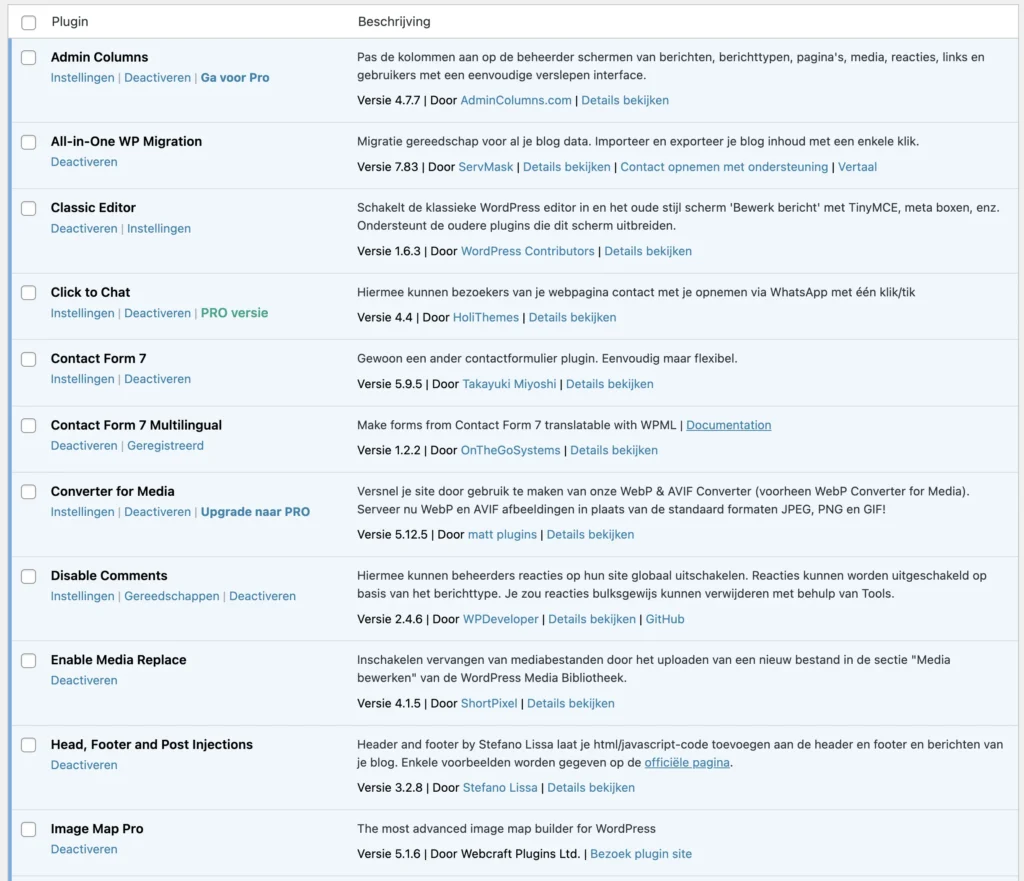
The beauty of WordPress is that almost everything can be solved with a plugin, but therein lies also directly the danger. Plugins that add many functions to your website can not only make it slow, but also pose a security threat. Plugins with poorly maintained code are a regular prey for hackers and other rogue characters, so you want these in your website as little as possible.
Therefore, it can’t hurt to regularly take a look at your plugin list and check if plugins are still up-to-date and needed. In case a plugin can be updated, do it one by one to see if the update does not affect your website negatively. Do you see plugins that can be turned off completely? Then do so immediately and don’t forget to remove them – even though a plugin is deactivated, it is still on your server and thus remains a potential target.
Should you need new plugins to add new features to your website, it’s a good idea to first check if you don’t already have a plugin that includes this feature. If not, we always recommend downloading only plugins from trusted sources. Think of WordPress’ own plugin database or major developers such as WPEngine and OnTheGo Systems.
Also, when looking at WordPress’ plugin database, always pay attention to a plugin’s reviews, how often it has been installed and when it was last updated. If you have any doubts, first see if you can install the plugin on a separate environment to test it safely. Should you need help with this? Please contact me and I will be happy to help you.
Be an admin in function, not in name
Many attacks by hackers are automated and try to enter your website based on previous patterns. A simple example is trying the combination ‘admin’ & ‘password’ for your username and password. So it sounds obvious, but make sure you don’t have users in your WordPress system with the username ‘admin’ or ‘webmaster’, but unique usernames that are clearly different from each other.
The same goes for passwords, of course. Create unique passwords for each account and make sure you don’t use the same credentials for numerous websites. Ideally, you should have your passwords used by a
To complete the login security of your website, I also recommend enabling two-factor authentication (also known as 2FA). Using a plugin like
Hand it over
Is your head already spinning from terms like two-factor authentication, core updates or phishing attacks? Then there is always the option to have your website actively managed by a website partner such as Brendly. I will regularly check your website, keep your plugins up to date and check for other security risks. This way, you can focus on your business while your website stays up and running.
Do you have questions or want to talk about what I can do for your website? Then contact me at- I’m happy to talk to you.
Why is WordPress security important?
What does good hosting do for my website security?
How do I use WordPress plugins smartly?
What can I do against brute force attacks?
Which plugin help with extra security?
What if I prefer to have my website managed?
If you don’t want to have to worry about updates and security, you can outsource management to a partner like Brendly. This keeps your website safe and up-to-date.