


The right way of using images is essential to the performance of your website. You can take it to the next level in terms of visual appeal, and SEO performance can be significantly improved with it. But what’s the best way to go about it? We’ll explain it to you!
In this tutorial, we will discuss image rights, usage within WordPress, image formats and resolutions, resizing tools and a bit of video. Videos are increasingly used alongside images to make a website more attractive, only it is not without risks, if you are not aware of the do’s and dont’s.
Using royalty-free images
Just pulling an image from Google. It seems like such a good idea, but it’s not allowed. If you don’t have the proper rights to use an image on your website, it can result in a hefty bill. It is therefore wise to create your own image bank with material that has been commissioned by you or created by you.
If you don’t own your own image bank, there are several websites these days where you can get royalty-free images from. Think of websites like Pexels, Unsplash and Pixabay. There are different types of licenses and sometimes rules you have to follow for use. Look at this carefully per website and image and adhere strictly to the rules.
Uploading images to WordPress and usage
To use images on your website, it is important to upload them to the WordPress media library. When logging into your environment, you will come across the media library tab in the admin area. Here you can add a new image by dragging it directly from your computer into the website’s library. You can also find all your previously added images here. This is also where pdfs and videos (on your own server) are added. When moving a domain name, this will not lose the linking and everything will remain visible within your website.
In addition to the internal library in WordPress, the platform also offers a tool to crop and scale images. You can click on an image and edit the image from there. Should you end up not being satisfied with the result, you can simply restore the image. Scaling images can be a handy solution to keep them from displaying too large.
Finally, we see regular difficulty with getting image right in the frame of the website. Our tip is to make the object you want to frame the focus point. The key here is to have the object in the center of the image.
Below is an example with an explanation:
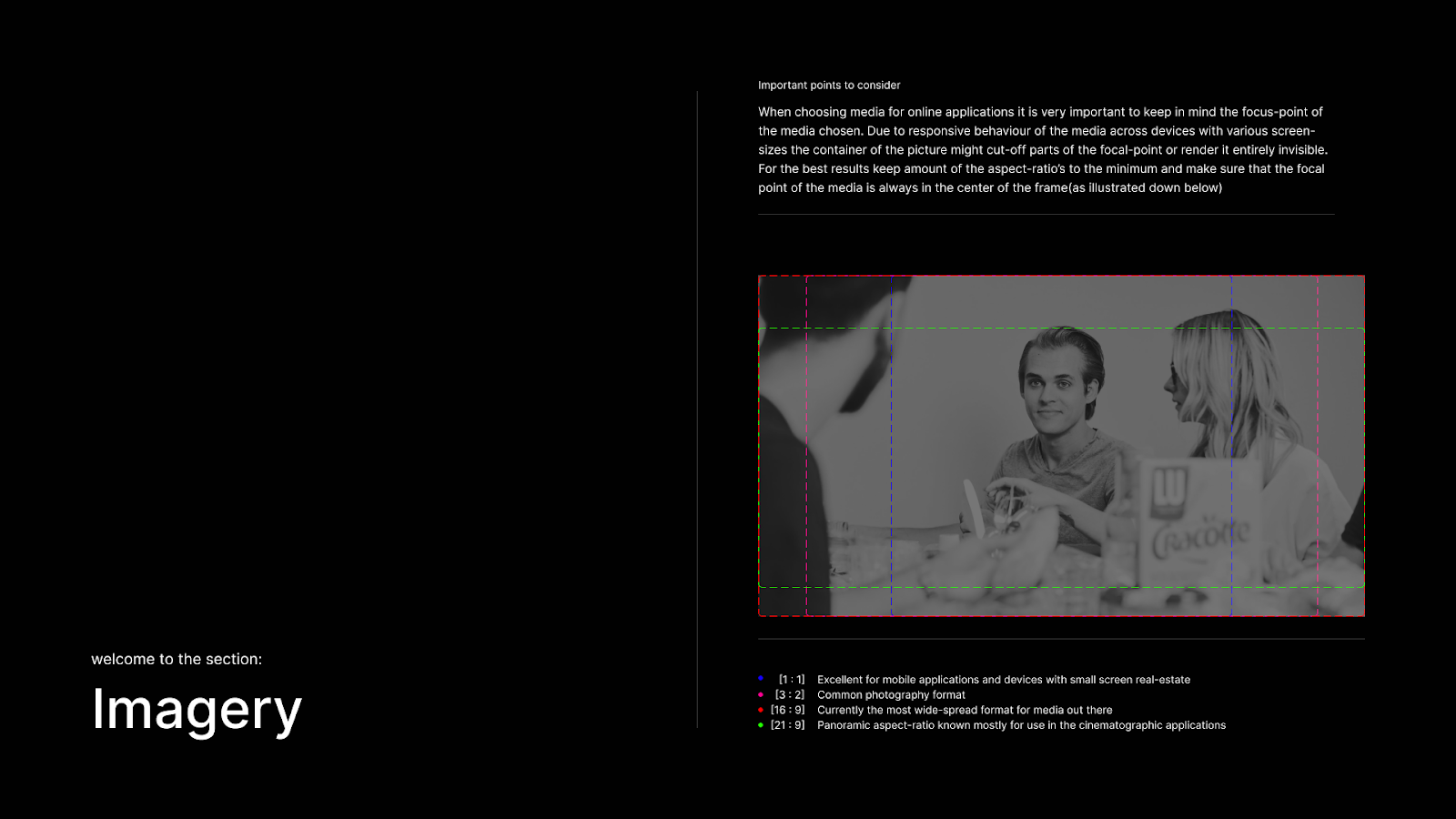
Resolutions and formats of images.
It frequently happens that images lose sharpness when placed or, on the contrary, are much too large for their purposes. It is therefore useful that you are aware of the different formats. To use images within your WordPress website, it is best to use JPG, PNG or WebP.
JPG is good for photos and images without transparency thanks to its often small file sizes, but can sometimes fall short in terms of quality. PNG images retain their transparency which is useful for logos and icons, but are often too heavy for large images. WebP is a modern format that is increasingly widely supported and combines aspects of both file types, but requires support in the Web site.For using icons, we recommend the scalable SVG format.
In addition to file formats, it is good to consider resolutions. To use full-width images, we recommend keeping Full HD images (1920 x 1080 pixels). Full HD gives a nice balance between image quality and file size. As such, Full HD also provides a nice solution for most screen sizes.
In addition, when using images within WordPress, we always recommend keeping images under 500kb. This prevents long loading times within your website. If images are initially much too large, you can use tools that can compress them.
Tools for resizing images.
Compressing images sounds like a complicated job, but these days it’s a matter of looking up a tool, inserting your images and pressing compress. Then you can download the reduced image and use it in your Web site. Useful tools to use include TinyPNG and ImageOptim (Mac).
Use of video
Because the use of video is becoming increasingly important within websites, we also briefly include this section in this guide. There are two ways to put videos on your website and that is on your own server or through an external service like YouTube or Vimeo.
On your own server, upload them to your media library. When choosing your own server, try to keep a video between 10 and 20 mb and use no more than 1 or 2 videos per page. By doing so, you will again avoid delays.
Why choose videos on your own server? You are not bothered by any ads and you also have good control over usage and privacy. Also, you can completely align a video player within WordPress with your corporate identity and gives better SEO for your own website. Finally, you don’t suffer from loss of quality due to compression.
So why house it externally?
If you put the videos on a remote server, there is a lot less server load and the quality of the video is better. It also has no impact on your SEO, as these files can be found just as well through searches. It is easy in WordPress to load a video via an embed and the support on mobile, for example, is also there. Good to keep in mind that videos on YouTube and Vimeo are publicly visible and thus it is harder to target them to certain audiences.
SEO in image usage
Besides making images visually appealing on your website, it is also good to optimize them for SEO. This is important to increase visibility in search engines.
1. Using alternative text (Alt text). An Alt text actually provides a description of the image for search engines and users who cannot see the image (for example, people who are blind). Make sure this text is relevant and does not go into too much detail.
2. Use descriptive file names. Give your images relevant and short descriptive names that sufficiently cover the content of the image.
Need help? Let us know!
If you can’t figure it out or would like more information, please contact us.
Can I just use an image from Google?
How do I upload images to WordPress?
What file formats are suitable for WordPress?
How do I keep image files small for good load times?
What are the advantages of having videos on your own server?
How do I optimize images for SEO?
Use a clear alt text for each image and give files a short, descriptive name. This helps search engines better understand your content and increases the findability of your website.